FAIL (the browser should render some flash content, not this).


Sensors used in the project:

1-Encoder:

    Rotary encoders, also called rotary shaft encoders or rotary shaft-angle encoders, are electromechanical transducers that convert shaft rotation into output pulses, which can be counted to measure shaft revolutions or shaft angle.
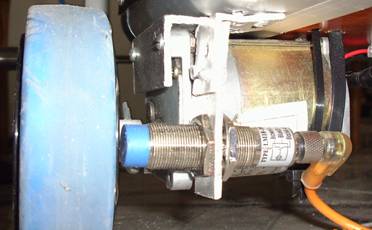
We used an inductive sensor to detect needles in wheels and we take theses pulses to the PLC to count it and save it in registers for using it in play back mode as we can see in the fig the sensor attached with the wheels.


2-Photoelectric sensor
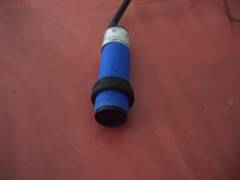
We used 3 types of photo electric sensors the first type is 10 mm photoelectric proximity sensor as shown in fig. we used this on to detect the object will be carried on the vehicle .


The second type:

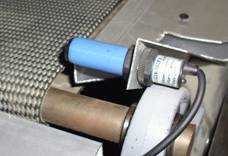
Is a 2m photoelectric proximity sensor with reflector we used this type, connected with reflector, on the belt to detect the movement of the object on it and no. of objects carried. As shown in the following fig.


The third type:

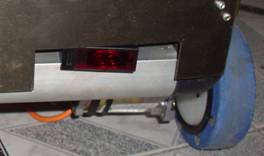
Is a 2m photoelectric proximity sensor but without a reflector this sensors placed in front of the vehicle to detect any obstacle in front of it to stop and give alarm to make the operator remove the obstacle.


Relays
A relay is an electrically operated mechanical switch. Current flowing through the coil of the relay creates a magnetic field which attracts a lever and changes the switch contacts. The coil current can be on or off so relays have two switch positions and they are double throw (changeover) switches. The type of relays we use in the project is shown in the fig.

This type of relay has 14 terminals 2 for the coil (24DCV) and 4 for the common and 4 for the NO and 4 for NC.


Dc motors:

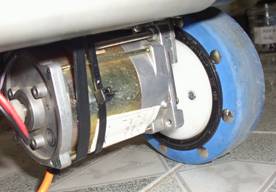
1-We used 2 motors 180 R.P.M for driving we operate them with 12 DC volt as shown in the fig.

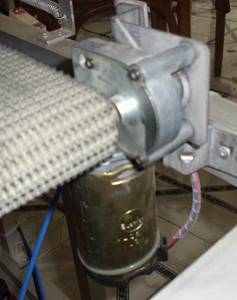
2- We used a 1 motor 90 R.P.M for driving the belt. This motor has a worm gear connected with eternal gearbox to increase the torque generated.


LCD:

It is used to show some words such as “error” when anything in front of the robot way, Number of boxes. There are two push buttons one for rest and the other for manual counts notes that these buttons does not affect the controller.

This means that the robot working probably


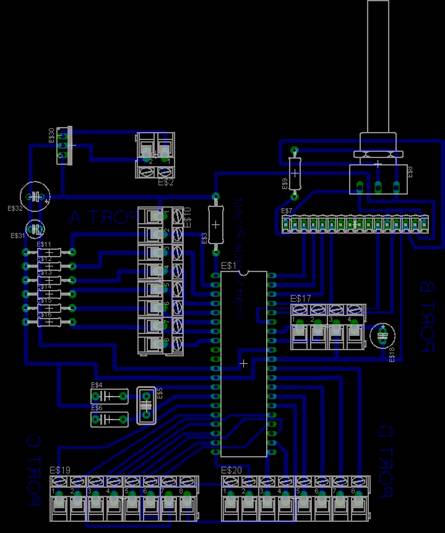
PCB for the microcontroller to control the LCD:


Microcontroller program for LCD:

This program is written by the compiler PIC basic.

DEVICE = 16F877               ' We'll use a PIC16F877 PIC micro

            XTAL = 4                                          ' With a 4MHz crystal

dim ahmed as dword
dim mmm as dword
dim x    as byte
trisb = 0
trisd = 128
trisc=0
trise=0
adcon0=0
adcon1= 7
TRISA = 63

ahmed =  0
mmm = 0        
x = 0

cls

start:
if porta.0=1 and porta.1=0 then
portd.0=1
print at 2,1, "Obstacle: Right","        "
endif

if porta.1=1 and porta.0=0 then
portd.0=1
print at 2,1, "Obstacle: Left","        "
endif

if porta.1=1 and porta.0=1 then
portd.0=1
print at 2,1, "Obstacle: Both","        "
endif

if porta.1=0 and porta.0=0 then
portd.0=0
print at 2,1, "NO Error","             "
endif

if porta.2=1 and ahmed = 0 then
x= x + 1
endif
if porta.2=1 then
ahmed= ahmed + 1
ELSE ahmed = 0
endif


if porta.3=1 and mmm = 0 then
x= x - 1
endif

if porta.3=1 then
mmm = mmm + 1
ELSE mmm = 0
endif

if x > 10 then x = 0

print at 1,1, "No of BOXES: ",dec x,"         "

if portd.7=1 then goto setting

delayms 200

goto start

setting:
print at 1,1, "Setting mode:-","          "
print at 2,1, "No of BOXES: ",dec x,"         "
if porta.0=1 then cls
if porta.5=1 then x= x + 1
delayms 500
if x > 10  then x = 0
if portd.7=1 then goto setting

goto start


SMART VEHICLE PROJECT